Raw spreads.
Global markets.
Fast Execution.

Tight Forex
begins at ZERO

MT4 trade Analysis tools.
24/5 multilingual support.

Smart Trading
begins at ZERO

More Products.
MT4 & MT5 platforms.
Tight spreads.

Start trading
with a Regulated broker

Raw spreads.
Global markets.
Fast Execution.

Tight Forex
begins at ZERO

Autochartist

What Benefits Does Autochartist Bring to Your Trading?

Icon

Efficient Analysis

Icon

Advanced lnsights

Icon

Risk
Management

Icon

Streamlined
Trading

Icon

Time Saving

Icon

Expert advice

Autochartist is a renowned trading analysis tool designed to empower traders worldwide with cutting-edge technical analysis, pattern recognition, and market insights to make informed decisions and seize trading opportunities.
Gain Free Access to Autochartist Tools on Our Client Portal – Exclusively for Verified Clients!
Why Traders Choose Autochartist
Real-Time Trade Setups
Autochartist provides traders with real-time trade setups, helping them identify potentially profitable opportunities as they happen.
Suitable for All Experience Levels
Whether you're a novice or a seasoned professional, Autochartist caters to traders of all experience levels, offering insights and opportunities tailored to your needs.
Convenient Access
Gain access to trading opportunities directly within your trading platform, ensuring a seamless trading experience.
Advanced Search Functions
Experienced traders can perform advanced searches to refine their trading strategies and identify specific opportunities that align with their preferences.
Time Saving
Save valuable time by leveraging Autochartist's automated market scanning capabilities, allowing you to focus on decision-making rather than extensive analysis.
Visual Quality Indicators
Traders can benefit from visual quality indicators that make it easier to interpret chart patterns and make informed decisions.
HOW TO USE AUTOCHARTIST
Download and Installation Guide
Please note: the pluqin is only available for our verified clients. lf you are new to ZERO Markets. please open an account and get your ID verified.
Step 1
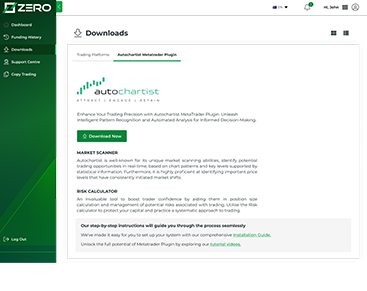
Access your Client Portal, click on the Downloads tab from the left-side panel, select Autochartist Metatrader Plugin and click on Download now.
Step 2
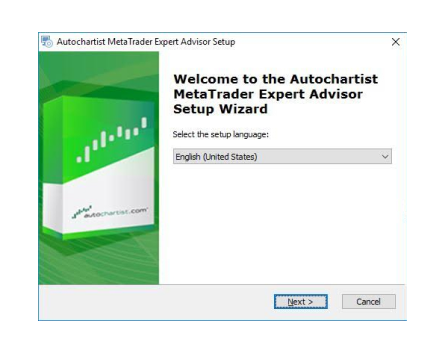
Open the downloaded file and click “yes” on the user account control pop-up. The first window will ask you to select the language you wish to display during the rest of the installation.
Step 3
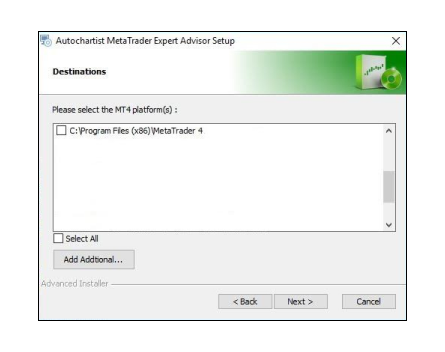
After the welcome and disclaimer windows, the installer will determine all valid installations of MetaTrader and display them in a list. Tick the check box next to each MT4/5 platform you wish to install this plugin for. if your MetaTrader platform is NOT listed, please see the Trouble Shooting Section
Step 4
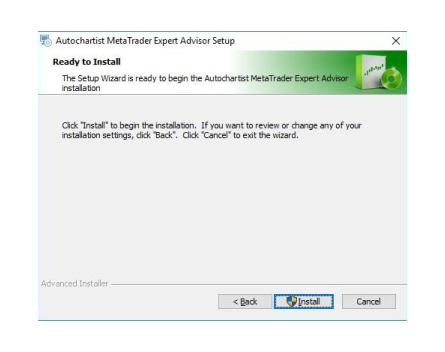
Click install. Then click Finish.
STEP-BY-STEP-GUIDES ON
Autochartist features
Market Scanner
Autochartist is well-known for its unique market scanning abilities, identifying potential trading opportunities in real-time, based on chart patterns and key levels supported by statistical information.
Furthermore, it is highly proficient at identifying important price levels that have consistently initiated market shifts
Download user guide.
Risk Calculator
An invaluable tool to boost trader confidence by aiding them in position size calculation and management of potential risks associated with trading.
Utilise the Risk calculator to protect your capital andpractice a systematic approach to trading.
Download user guide.
TECHNICAL PROBLEM
Troubleshooting
Please note: Some Anti-Virus software incorrectly detects our plugin installer as a virus.
MT4/5 Installation -Invalid Destination
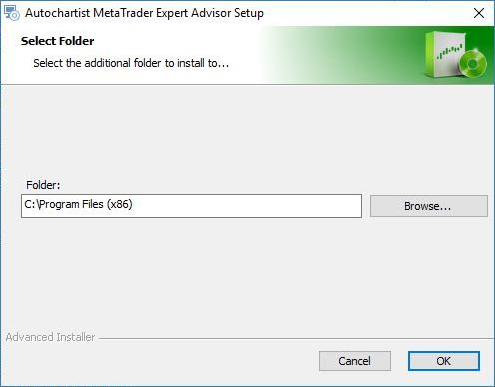
1. When installing the plugin, if your MetaTrader terminal was not listed during the detection step, press the “Add Additional…” button.
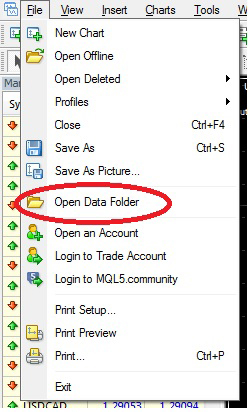
2. Start your MetaTrader terminal, and click on File', then click on 'Open Data Folder'
3. A Windows Explorer window will open up.Click on an open space next to the address bar to highlight the path.
4. Copy the path in the address bar and return to the Autochartist installer.
In the Autochartist installer, paste the path in the text box labelled 'Folder:', Click Ok
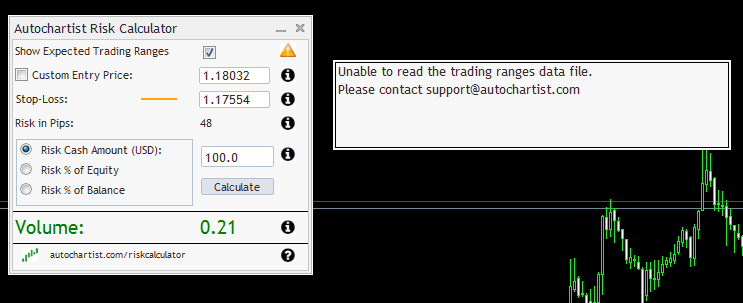
Risk Calculator
If the above error occurs, please contact [email protected]

Bắt Đầu Giao Dịch Forex Hôm Nay

Mở Tài Khoản & Giao Dịch Tức Thì

Icon

Được cấp phép & Quản lý

Icon

Nghiên Cứu & Đào Tạo

Icon

Công Cụ Phân Tích Kỹ Thuật

Icon

Tỷ Giá Minh Bạch

Icon

Điểm Đến Tin Cậy Của Bạn

Icon

24/5 Hỗ Trợ Trực Tuyến

Icon

Đào Tạo Online

Icon

Giao Dịch Bất Cứ Đâu

Icon

Mở Tài Khoản Nhanh Lẹ

Support icon

24/5 Hỗ Trợ
Khách Hàng

Đội ngũ hỗ trợ khách hàng đa ngôn ngữ của chúng tôi luôn túc trực 24/5 để hỗ trợ bạn.
Liên Hệ Chúng Tôi

Questions icon

Bạn Có
Thắc Mắc?

Truy cập mục các câu hỏi thường gặp (FAQ), bạn sẽ tìm thấy tất cả các thông tin về dịch vụ chúng tôi cung cấp và câu trả lời cho các câu hỏi liên quan đến các giao dịch của bạn.
Trung Tâm Hỗ Trợ

Analysis icon

Theo dõi chúng tôi để nắm bắt
Xu Hướng Thị Trường

Luôn cập nhật xu hướng và phân tích thị trường bằng cách theo dõi chúng tôi trên mạng xã hội hoặc truy cập blog thị trường tài chính của chúng tôi.
Blog